Quishing Scams are on the Rise - Technicalities

Quishing Scams are on the Rise!

One of the latest threats in the world of cybercrime is quishing—a form of phishing that uses QR codes to lure individuals into scams. As the use of QR codes has surged in recent years for everything from digital payments to contactless check-ins, so too has the opportunity for hackers to exploit this technology. The recent escalation in quishing scams is cause for concern, as more users and businesses fall prey to these attacks.

Quishing, a blend of “QR” and “phishing,” is a phishing attack that relies on malicious QR codes. These scams often bypass the visual cues associated with traditional phishing emails, making them harder to detect. Instead of clicking on suspicious links in an email, a user is tricked into scanning a QR code that redirects them to a harmful website. Once there, the victim might be prompted to enter personal details, such as login credentials or payment information, or the site may download malware onto their device.

How Quishing Scams Work

Here’s a breakdown of a typical quishing scam:

  • Step 1: Delivery of the QR Code: Scammers can send malicious QR codes through various channels—email, SMS, social media, or even printed materials. The QR code may appear to be from a trusted source, such as a well-known company or even an internal colleague.
  • Step 2: Scanning the QR Code: When the victim scans the QR code, they are redirected to a fraudulent website. This website may look legitimate and might even mimic the look and feel of popular brands or financial institutions.
  • Step 3: Data Theft or Malware Installation: The website will either ask the user to input personal information or automatically download malware onto their device. In some cases, the scammer could intercept sensitive information, such as usernames, passwords, or credit card details.

Recent Incidents and Escalation

Over the past year, cybersecurity firms have reported a sharp increase in the number of quishing attacks worldwide. Several incidents highlight the escalation of this threat:

  1. Fake Payment Portals: In Europe, hackers have been sending out fake QR codes disguised as payment portals for utility bills or tax payments. Users who scanned the codes were redirected to websites where they unknowingly gave away their banking information.
  2. Phony Restaurant Menus: In some cases, fraudsters have placed fake QR codes on restaurant tables, which directed customers to malicious websites instead of online menus. These websites attempted to harvest personal information or download malware.
  3. Government Impersonation: In one case, a group of scammers used quishing to impersonate a government agency, sending out letters with QR codes for users to “verify” their identities for tax purposes. Victims who scanned the codes ended up giving away sensitive personal details.

    Current example of a Quishing Compromise

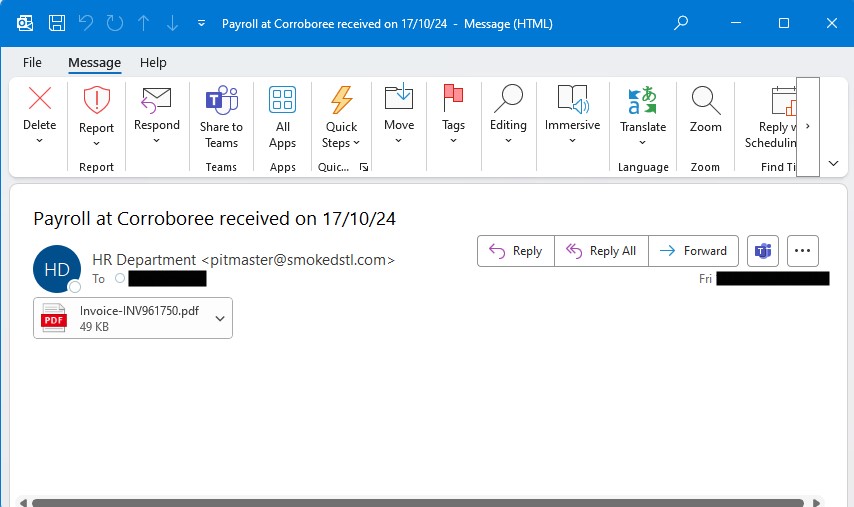
    Look out for the email sender. The name ‘HR Department’ is just a made up name. The actual sender in this case, pitmaster@… is likely unknown to you, in fact they have likely been scammed themselves.

    The subject is often deliberately enticing. But does it line up with your payroll system, or superannuation fund.

    The email body is totally blank. There is no text at all. Take this as being highly suspicious. Keeping this blank is a deliberate method to avoid email filtering scam detection.

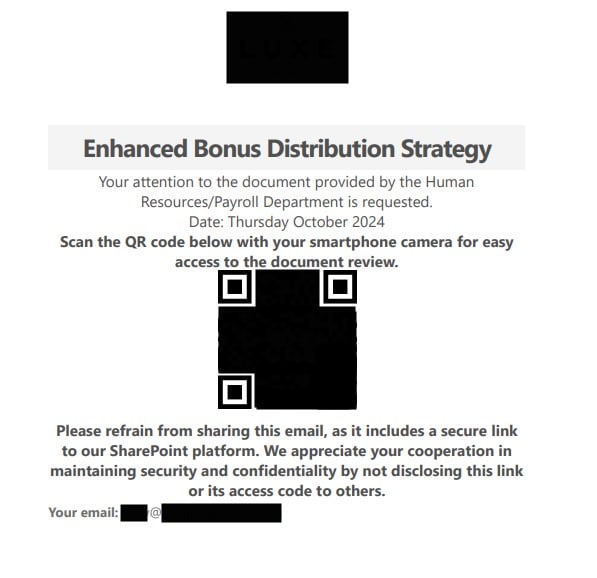
    Finally, there is a PDF attachment. Unfortunately, only advanced email filtering software will be able to detect anything unusual in this email, such as the fact that the PDF has a QR code linked to a risky or fraudulent website.
    The PDF may have your customer logo on top of the page to add a little legitimacy. Remember, your logo is easily downloadable from the web.

    The QR code will open your default web browser. This will land on a web page asking you to log in to one of your accounts. In this live case, a Microsoft account was targeted.

    This is not Microsoft! In this case the web page is sitting on a virtual server hosted by CloudFlare in Petersburg, Virginia, USA.

    By logging into your Microsoft account on this ‘fake’ web page, you will be handing over your Microsoft credentials to a nefarious character.

    As these scams become more sophisticated, the time between unintentionally handing over your credentials, and having all of your emails copied away is narrowing. It could be as little as 1 hour.

    Don’t open these emails. Warn your work colleagues not open them. If you have, call our helpdesk as they can quickly perform password resets, and revoke access.

    Get in touch for advice and options for email security enhancements.

    Other news & articles

    Why Choose Technicalities as your MSP?

    About Technicalities Why Choose Technicalities as Your IT Partner? Established 1998  ·  Melbourne, VIC 1998 Established in Melbourne 25+ Years serving Melbourne businesses 15+ Years — our longest-serving engineers Our Philosophy Choosing an IT partner is a bigger decision than it might first appear. You’re not just buying a service — you’re deciding who picks…

    AI Phishing attacks Microsoft

    Cyber Security AI Is Now Driving 86% of Phishing Attacks — and Microsoft Is the Primary Target May 2026  ·  Technicalities 86% of phishing attacksnow AI-driven +139% increase in reverse proxyattacks stealing M365 credentials 41% of AI phishing attacksnow target Microsoft Teams Key Takeaway Phishing has moved well beyond suspicious emails with bad grammar. AI-powered…

    Stryker Cyberattack: Lessons for Business Security

    🚨 Cyber Alert The Stryker Attack:No One Is Too Big to Fall Published: March 2026  ·  By: Technicalities ⚡ Key Takeaway A US Fortune 300 company with 56,000 employees and a USD$25 billion revenue just had tens of thousands of devices remotely wiped in a matter of hours. The attack vector wasn’t exotic — and…