Scam Alert
Most “Human Verification” Popups Are Real. This One Style Isn’t.
September 2026 · By Eyal Geiger, Technicalities
The short version
A scam called ClickFix dresses itself up as a normal “prove you’re not a robot” check, then talks you through pressing Windows+R, Ctrl+V, and Enter. No CAPTCHA has ever needed that. Those three key presses paste and run a hidden command that installs malware on the spot, and the ACSC is now warning that Australian business websites are being hijacked to serve exactly this.
517%
the rise in ClickFix-style attacks in the first half of 2025, per ESET research
2nd Most Common
attack technique blocked in that period, behind phishing alone
Early 2026
when the ACSC first flagged this hitting Australian business websites directly
How the Scam Actually Works
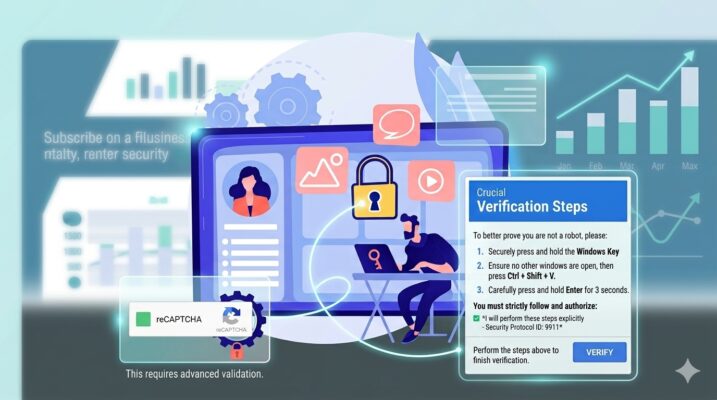
It starts on a website that looks completely normal, often a legitimate small business site that’s been quietly compromised without its owner knowing. A popup appears asking you to “verify you’re human,” styled to look exactly like a Google reCAPTCHA or a Cloudflare security check, both of which are real, everyday parts of the web. Then it asks for three things, in order: hold the Windows key and press R, press Ctrl and V, then press Enter.
The moment that popup loaded, invisible code on the page silently copied a command onto your clipboard. You didn’t copy anything yourself, the website did it for you the instant the page opened. Windows+R opens the Run dialog, a genuine Windows tool for launching programs by name, nothing to do with any CAPTCHA. Ctrl+V pastes that hidden command into it. Enter runs it. Within seconds, a hidden window quietly downloads and installs malware, with no install screen, no antivirus popup, and nothing that looks unusual to the person who just typed three keyboard shortcuts.

A real example, styled to look like Google’s reCAPTCHA. The genuine version never asks you to touch the Run dialog.

Another version of the same scam, this time copying Cloudflare’s branding instead of Google’s.
What it looks like
A routine security check, the same kind every website uses to filter out bots. Familiar logos, familiar language, nothing alarming.
What it actually is
A hidden command being pasted into one of Windows’ own tools and executed with your own permissions, because you were the one who pressed the keys.
That last point is exactly why this scam works so well. Because a real person deliberately presses each key, it doesn’t look like an automated exploit to a lot of security software, and it doesn’t need the attacker to find a software vulnerability at all. It just needs someone to follow three instructions that sound reasonable.
What It’s Actually Installing
The specific malware the ACSC has linked to the current Australian campaign is called Vidar Stealer, an information-stealing program that pulls saved passwords, browser autofill data, cryptocurrency wallets, and general system information straight off the infected device. The advisory notes attackers are getting onto the compromised websites themselves by exploiting outdated WordPress installs and plugins, then quietly injecting the fake verification popup for every visitor to see.
That makes this a two-sided risk for a business. You can be the visitor who gets tricked by a compromised site you had no reason to distrust, or, if your own website runs on WordPress and isn’t kept patched, your business’s site could be the one silently serving this to your own customers.
Other Versions to Watch For
ClickFix is the original and most common version, using the Run dialog, but it’s not the only one making the rounds. The trick is always the same: a hidden clipboard payload and a set of instructions that sound technical enough to seem legitimate.
- FileFix: the same hidden command, but pasted into Windows File Explorer’s address bar instead of the Run dialog.
- TerminalFix: victims are talked through opening PowerShell directly and pasting the command there.
- DownloadFix: disguised as a failed file download, offering a “repair tool” that’s actually a malicious file to run manually.
How to Protect Yourself and Your Business
- Learn the one rule and share it with your team: no CAPTCHA, security check, or verification screen has ever needed you to open the Run dialog, File Explorer, or a terminal, and paste anything into it. If a popup asks for that, close the tab.
- Keep WordPress, plugins, browsers, and operating systems patched. The ACSC’s advisory ties this campaign directly to outdated WordPress sites being used as the delivery point, so an unpatched business website isn’t just a risk to the business, it’s a risk to everyone who visits it.
- Use phishing-resistant multi-factor authentication so a stolen password alone isn’t enough to get into an account.
- Restrict who can run scripts and install software on business devices, so even if someone does paste and run a malicious command, it has less to work with.
- If it’s already happened, treat it as a compromise, not an embarrassment. Disconnect the device and move straight into incident response rather than waiting to see what happens.
The one line worth remembering
If a verification screen ever asks you to press Windows+R, open PowerShell, or paste anything into a technical-looking box, that is not how CAPTCHAs work, anywhere, ever. Close the tab.
Not Sure If Your Business Website Is Exposed?
Technicalities can check your WordPress site and plugins for the exact weaknesses this scam exploits, and lock down what a compromised device can do if someone does get tricked.
Contact Us
EG
Eyal Geiger LinkedIn ↗
Eyal has spent the last four and a half years in Customer Relations at Technicalities, working directly with Melbourne businesses on the IT and cyber security issues they run into day to day. He writes from that vantage point, covering the questions clients actually ask and what tends to fix them.